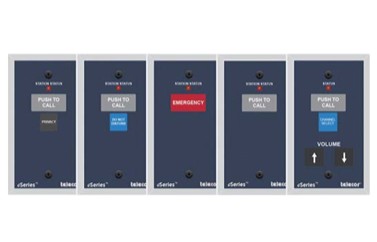
Telecor eCS-Series Call Stations are used to initiate calls from remote locations to eSeries eConsoles. These stations are specifically designed to operate with eSeries eS8-TB or eS8-TB4 Talkback Speakers or the e365-TB Message Display/Clock.
The eCS-1, eCS-2, and eCS-6 Call Stations utilize a momentary contact touchpoint to initiate a “Normal” priority level call from a remote location. The eCS-3 will initiate an “Emergency” priority level call. All 4 stations have a Call Assurance LED that provides call confirmation. When a call is placed, the LED flashes, confirming call placement. The LED continues to flash until the call is answered by the console operator. The Status LED also indicates the state of the station.
The eCS-1 Call Station is equipped with a “PRIVACY” touchpoint that, when pressed, places the room into privacy mode, preventing monitoring of audio activity in the classroom. When in privacy mode, the backlit “Privacy” button on the station illuminates, indicating privacy status. When a call-in is initiated from the room, the privacy status is automatically suspended for the duration of the call and automatically re-enabled afterwards. If a Console calls a room that is in Privacy, the console operator will be alerted and given the option to cancel the call, leave a message waiting indication or to connect regardless. If they connect, the room occupants will be able to hear the operator, but the operator will not be able to hear the room until an occupant turns off the Privacy feature.
The eCS-2 is equipped with a DO NOT DISTURB (DND) touchpoint that, when pressed, places the room into DND mode. When DND is enabled, the backlit LED on the station illuminates, indicating that the station is in a DND state, and scheduled events, zone pages and normal priority audio programs will not sound in the room. However, emergency pages, and announcements will continue to be broadcast into the room. When a call-in is initiated from the room, the DND status is automatically suspended for the duration of the call, and automatically re-enabled afterwards. If a call is placed to a room that is in DND, the console operator will be alerted and given the option to cancel the call, leave a message waiting indication, or to force the connection regardless of DND. If they connect, the intercom call to the room will proceed normally; this allows an immediate option to reach the rooms occupants in the event of an emergency.
Telecor eCS stations can provide “message waiting” indications to staff members. If no one is present in a room to respond to a call, or the room is in Privacy or Do Not Disturb mode, the console operator will have the option to leave a Message Waiting (MW) indication. If the MW option is chosen, the LED indicator on the room call stations will begin to pulse. When a call-in is initiated from the room, the MW indication will be automatically deactivated, and the call-in will be automatically routed to the console that left the MW indication.
The eCS-1, eCS-2, and eCS-6 Call Stations can also provide “Emergency” priority level call-ins by pressing the call touchpoint three times or pressing and holding the touchpoint for three seconds.
The eCS-3 Call Station utilizes a contact touchpoint to initiate an “Emergency” priority level call-in from a remote location. A Call Assurance LED provides call confirmation. When a call-in is placed, the LED flashes, confirming call placement. The LED continues to flash until the call-in is answered by the console operator. Consistent with the NEMA SB 40- 2008 Communications Systems for Life Safety in Schools standard, the eCS-3 allows the establishment of multiple call-in locations per room and a separate emergency call-in on a single Cat-5/6 cable.
Call Stations are fully supervised and monitored for connectivity by the host device (Talkback Speaker or Message Display/Clock). If a wiring fault is detected between a Call Station and the host, the host will audibly and visually indicate the error. In addition, the Status LED on the station will pulse to indicate a trouble condition. The ePort, eLog, eCI and eAmplifiers will also generate an alarm tone. The Call Station’s call-in destination is also monitored. If the device that is configured to receive the station’s call-in loses network connectivity, the host will automatically search for an alternate destination. If no other suitable call-in destinations exist, the host will audibly and visually indicate an error.