
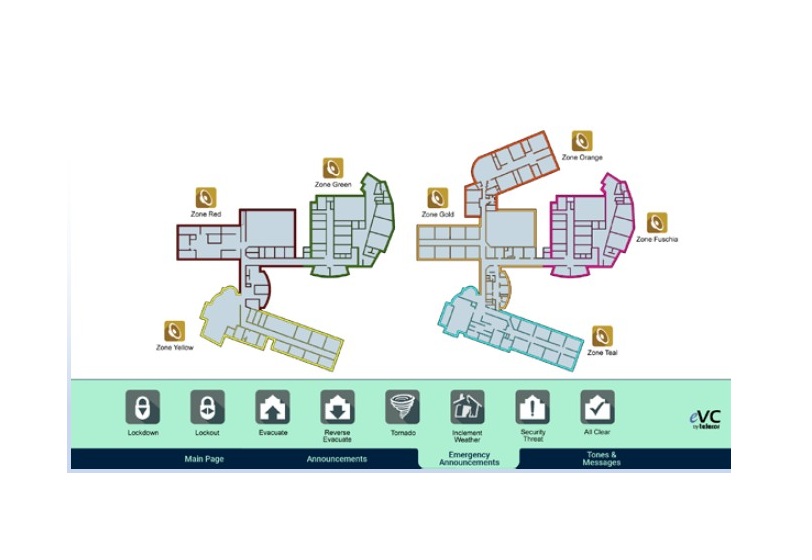
eSeries Visual Console (eVC) is a Windows-based application that provides a Graphical User Interface (GUI) for the eSeries System. The easy-to-use GUI simplifies a number of routine operations such as: call processing from stations, paging, audio distribution, activating scripts, and emergency operations by organizing thematically similar graphical element icons onto dedicated pages. Emergency communications can be quickly activated through intuitive on-screen icons, ensuring accurate operation.
eVC can be used off-the-shelf with a number of standard page templates, each of which are dedicated to certain eSeries operations. These pages provide representation of intercom stations, eConsoles, SIP phones, and paging zones in an easy to use and organized configuration. Alternatively, the standard page templates can be customized using bitmap images of the building floor plan as the background. Further customization is achieved by placing elements from the Element Library representing intercom stations, other eSeries devices, SIP phones, and paging zones onto the GUI according to the floor plan background.
eVC supports the creation of multiple audio recording distributions that play MP3 or WAV audio files when the associated element is clicked. Individual audio recording elements can be created to enable the user to play specific audio files in pre-programmed or dynamic zone (right-click) selected areas of the facility. These audio recordings can be used to play custom audio material such as music, tones, and announcements. For example, individual audio recordings can be created to announce the arrival of buses and inform students and staff members which buses are ready for boarding. Audio recordings distributed by eVC can be hosted on the computer running eVC or on eSeries System eAmps.
eVC provides an efficient and reliable method of notifying the facility occupants of emergency events. An Emergency Announcements page is dedicated to managing emergency operations with specific emergency elements. The activation of an emergency element will distribute a combination of an audio file as well as coded and scrolling textual messages. These emergency elements include: Lockdown, Lockout, Evacuate, Reverse Evacuate, Inclement Weather, Tornado, Security Threat, and All Clear.